This tutorial is an attempt to alleviate the headaches for all those who need to have IMAP with SSL running on OSX 😃. If you’ve ever struggled with configuring it properly, this step-by-step guide on how to compile IMAP with SSL will walk you through the process and help you avoid common pitfalls.
Needed Stuff to Compile IMAP with SSL
- autoconf
- openssl
- libxml2
- imap2007 install with brew “brew install imap-uw”
OR
- download from https://www.mirrorservice.org/sites/ftp.cac.washington.edu/imap/ (the archive without Z at the end ) imap-2007e
- ftp://ftp.cac.washington.edu/imap/
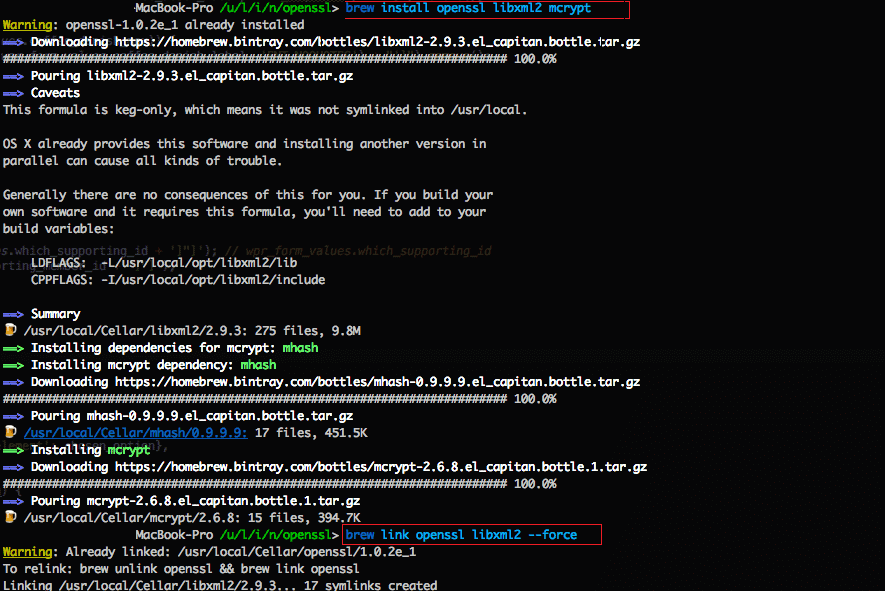
To install libxml2, you can use brew: brew install openssl libxml2 mcrypt
To link openssl to libxml2: brew link openssl libxml2 –force
See screenshot below:
Steps to Compile IMAP with SSL
Download map-2007e, unzip and run with terminal
make osx EXTRACFLAGS=”-arch i386 -arch x86_64 -g -Os -pipe -no-cpp-precomp”
it will create a folder c-client and might give a few warning, if it’s not fatal error, go on
use the following commands after running the command and the folder c-client is created
sudo mkdir -p /usr/local/include
sudo cp c-client/*.h /usr/local/include/
sudo mkdir /usr/local/lib
sudo cp c-client/*.c /usr/local/lib/
sudo cp c-client/c-client.a /usr/local/lib/libc-client.a
Now, for the next step to compile IMAP with SSL for PHP, download the version of PHP you require ( the one you use in MAMP )
– go to /Applications/MAMP/bin/php/<your_php_version> and create the folders /include/php/
– extract the php files there
– open terminal in that folder and run
./configure
cd ext/imap
phpize
./configure –with-imap=/usr/local/imap-2007 –with-kerberos –with-imap-ssl=/usr/
make
if
./configure –with-imap=/usr/local/imap-2007 –with-kerberos –with-imap-ssl=/usr/ fails
TRY
imap-2007f = depends on which one you installed
/Applications/MAMP/bin/php/php5.5.26/bin/php-config path to your php from MAMP for which you need the map with SSL
env LDFLAGS=”-lssl -lcrypto” ./configure –with-imap=/usr/local/imap-2007f –with-kerberos –with-imap-ssl –with-php-config=/Applications/MAMP/bin/php/php5.5.26/bin/php-config
if needed for –with-imap-ssl do –with-imap-ssl=/path_to_folder_that_contains evp.h file
Now Pray 🙂
If your prayers have been answered, go to the extracted php files, go to folder ext/imap/modules/ and copy map.so and map.la to
/Applications/MAMP/bin/php/YOUR_PHP_VERSION/lib/php/extensions/no-debug-non-zts-20100525/
This is one of the final steps in the process of how to compile IMAP with SSL, so if everything has gone smoothly up to this point, you’re almost there.
Tutorials that do not work from end to end, but they are worth mentioning as they provided useful information:
http://www.firewing1.com/blog/2013/05/13/compiling-imap-extension-php-5315-os-x-1083
http://blog.tatedavies.com/2012/12/17/compile-php_imap-and-mssql-for-php-on-mac/
https://github.com/tedivm/PHP_IMAP_Installer
This was address further up. Simply swap out:
./configure –with-imap=/usr/local/imap-2007f –with-kerberos –with-imap-ssl
With:
LDFLAGS="-lssl -lcrypto" ./configure --with-imap=/usr/local/imap-2007f --with-kerberos --with-imap-ssl
Relax and Enjoy 🙂
If you still have issues, please let us know.